Tired of reading all of the Warrior whining on the WoW forums, Nefarian has taken matters into his own hands. Now, you too can have have a rage bar, even if you’re not a Warrior. Hilarious if true.
Need More Rage? Pay Nefarian A Visit!
2
Tired of reading all of the Warrior whining on the WoW forums, Nefarian has taken matters into his own hands. Now, you too can have have a rage bar, even if you’re not a Warrior. Hilarious if true.
If your game screenshots aren’t everything you’d want them to be — brilliant and sharp — I’m going to share a few tweaks on how to juice them up.
I use Photoshop, but the tweaks are easily translated to almost any other intermediate or advanced image editing software. I’ll explain exactly what my adjustments do so you can hunt around in your chosen program to do the same.
A caveat: Photoshop and other advanced editors (e.g. Paint Shop Pro) allow the use of layers to perform image adjustments. You can play around with your adjustments to get a desired effect and if worse comes to worse, you can delete the layer and try again. This isn’t possible with most intermediate-type editors (e.g. IrfanView). If you’re using an editor without layer-capability, try out your adjustments incrementally and Edit » Undo adjustments that don’t work well.
We’ll talk about IrfanView and other intermediate editors tomorrow, Photoshop/advanced editors today.
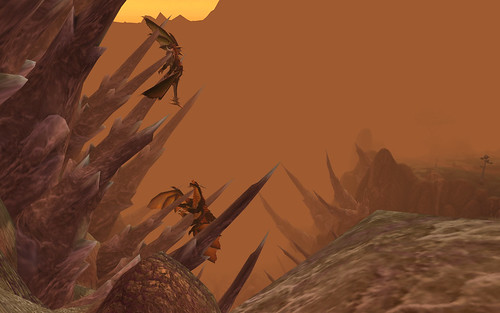
Here’s an example to work with, from World of Warcraft’s Blade’s Edge Mountains, a couple of dragonkin met their untimely deaths on the side of the mountain.
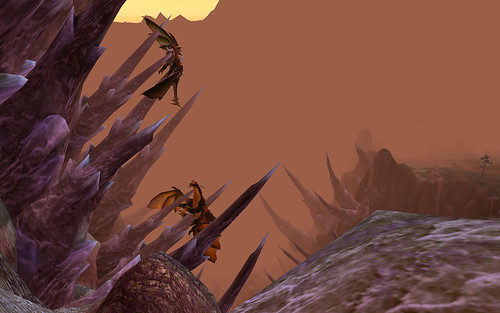
And here’s the juiced version of the same shot, after I applied my usual Photoshop adjustments.
The Carnival of Gamers #21 is available for consumption at Jason Preston’s gin joint. The Carnival is a nomadic (mostly) monthly showcase of articles by gamers, for gamers and about gamers. Next month’s location will be at Virgin Worlds.
Anyone with a blog or website who writes about games is welcome to particpate. If you’re interested in participating or hosting a Carnival, the Carnival HQ has the info you need.